You’ve just finished coding 15,000 open-ends from a brand tracker. The data’s sitting in structured Excel tables: responses, demographics, wave, NPS band, thematic codes.
Modern data analysis tools will theme-code tens of thousands of verbatims in minutes. But the moment you want to actually interrogate that data, you’re back in a spreadsheet, writing VLOOKUPs, trying to remember which column has the NPS score and dreading the inevitable “Can you break this down by a different demographic instead?” from your client.
The Bottleneck in Data Analysis and Reporting
The coding step used to be the bottleneck in qual and open-end analysis. The bottleneck is now what happens after: interrogating the coded data, which is a completely different kind of work.
Most research teams handle this one of three ways:
- Excel Tables: Open the coded file in Excel, start building cross-tabs or receive a monster cross-tabulation from your operations team. The data is there but slow, and every follow-up question from the client means starting again from scratch.
- Coding platforms: Some teams use dedicated text analysis platforms, but many were built before natural language querying existed. They’ll code your data, but interrogating the output still means navigating rigid menus, pre-set filters and export-then-pivot workflows. The tool handles the coding but stops short of letting you ask follow-up questions freely – so you’re still translating research questions into the platform’s logic rather than just asking what you want to know.
- Writing Code: Most insight managers and qual researchers can’t write code, so every ad hoc question becomes a request to the data team, which dramatically reduces turnaround times.
The same underlying problem in all three cases: you’ve got a research question in your head in plain English and you have to manually translate it into a technical operation. Which columns do I filter? Which do I group by? What aggregation? The thinking falls on the analyst instead of the data analysis tools.
Just Ask the Question: Natural Language Data Analysis
Natural language querying has been around in tools for years, but the early versions were pretty limited. You had to phrase things in exactly the right way or the system wouldn’t understand you. However, modern data analysis tools are genuinely good at interpreting what you mean, even when you’re vague about it.
So you type something like: “Top 5 themes for detractors in the South East, wave 3.” The system works out which columns matter, builds the query, runs it, gives you a table. You didn’t need to know any programming language. You don’t need to remember which column holds the region variable.
Following a Thread to Deeper Data Insights
The insights that end up in the debrief deck rarely come from the first question. They come from the fourth or fifth, when you notice something odd in the data and start digging.
A typical sequence during analysis:
- “What are the top themes overall?”
- “How does that change for detractors vs promoters?”
- “What’s the sentiment split on the billing confusion theme?”
- “Show me verbatims from detractors who mentioned billing.”
- “Has billing grown or shrunk since wave 2?”
Each question follows from the last. You’re weaving a thread between them, the way you would in a depth interview. In a spreadsheet that sequence takes half an hour of pivoting and reformatting, but in a conversational data analysis tool it takes minutes.
When a follow-up costs ten minutes of spreadsheet fiddling, people stop after two questions. When it costs thirty seconds, they keep going. They find the jewels of insights that they wouldn’t have otherwise uncovered. I’ve watched it happen in project after project: the researcher who would normally move on to writing the report instead keeps probing, and the third or fourth follow-up is what ends up on slide one.
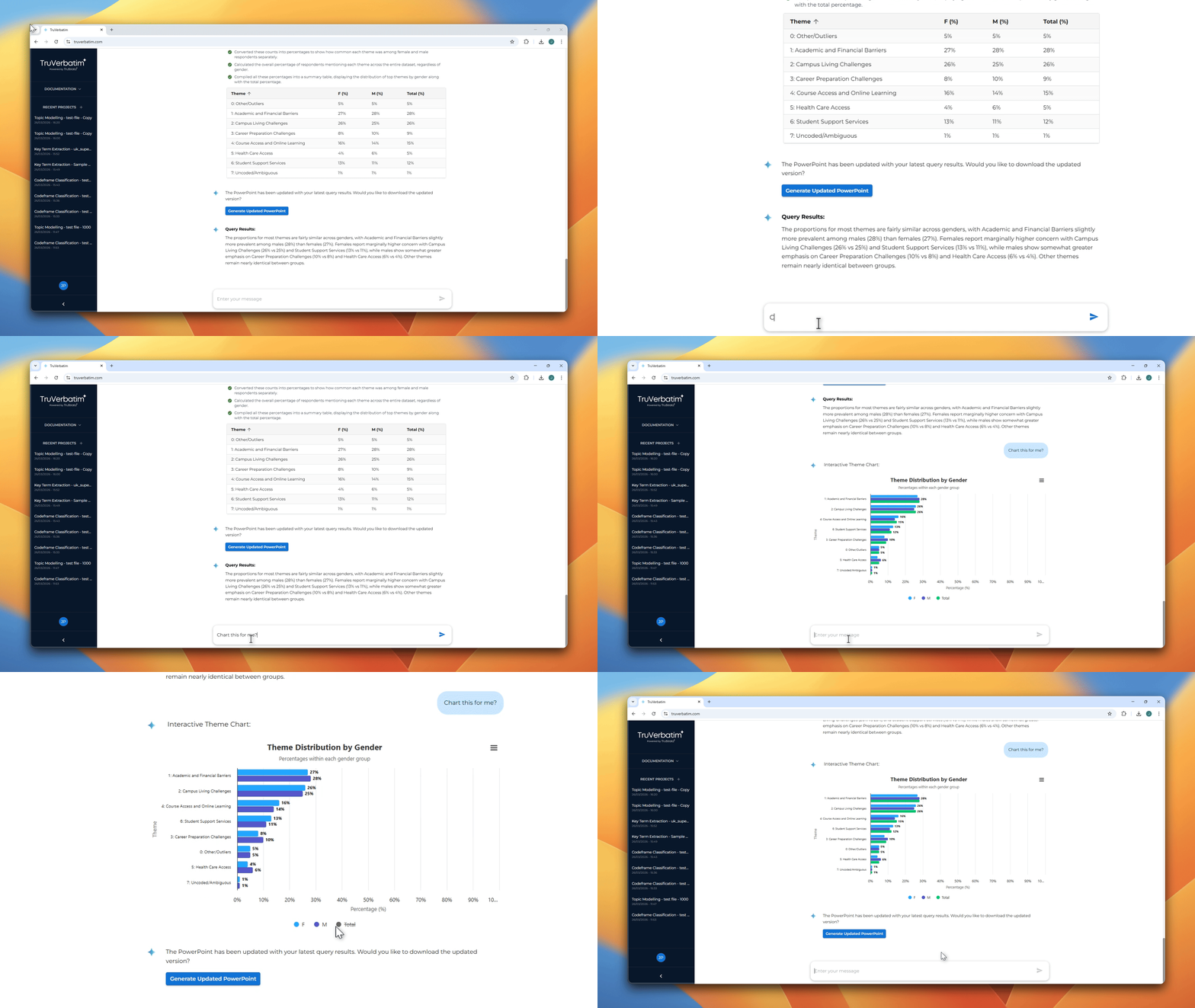
This conversational approach to data interrogation is built into TruVerbatim. Ask a question, get an answer, follow the thread – no pivot tables required. Explore TruVerbatim.
It Looks Right, But Is It? Verifying Your Data Analysis
If you ask “which themes are most common among younger respondents?” the system needs to decide what “younger” means. Under 25? Under 35? It needs to pick the right column with lots of degrees of freedom to interpret your question.
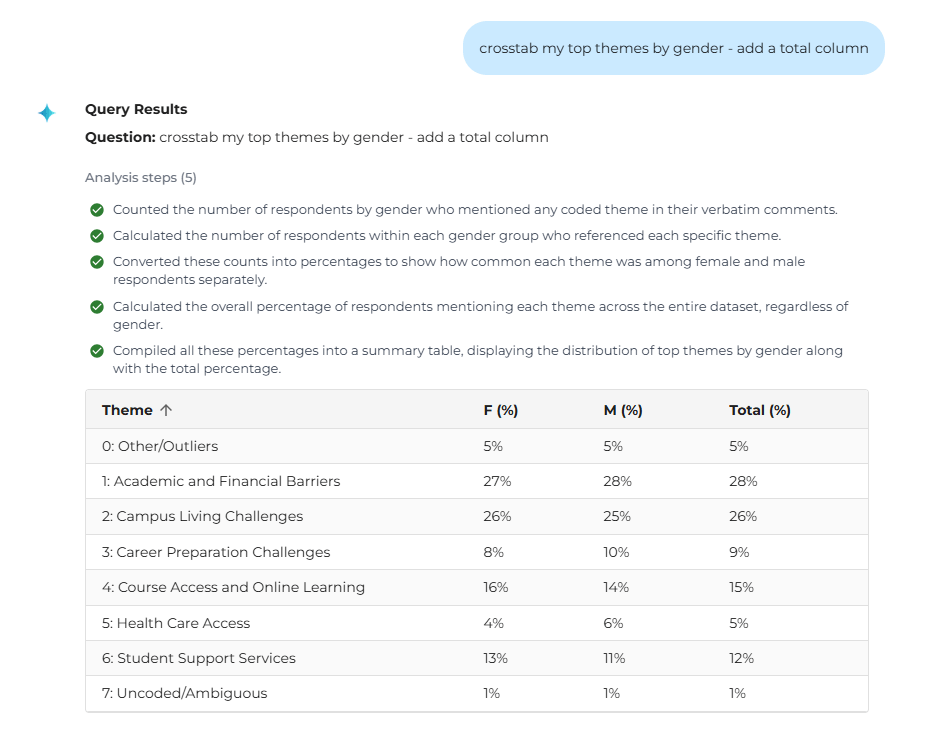
A good data analysis tool will deal with this by showing you the steps it has taken to get to the final output. You get to see which columns were selected, what filters were applied, how it aggregated.
If it interpreted “younger” as under 30 and you meant under 25, you just correct the question and run it again.
Think of it like briefing a junior colleague. You want them to show their method, not just hand you a number, and you get to stay in control.
Reporting Without Pain: From Data Analysis to Presentation
Cross-tabulations and PowerPoint reports are the backbone of any survey analysis, but modern data analysis tools for reporting remove the barriers that used to make this painful.
Client says: “Show me how themes differ across the three segments we defined in the quant.” So you build the pivot table or write a tab spec for your operations team. You have to analyse each verbatim and write a summary of the findings. There goes your afternoon and you haven’t even started on the deck.
Or you type one question and get back a table with percentages, representative verbatims and a written summary of the notable differences. Something like: “Delivery themes make up 34% of Segment A but only 12% of Segment C, suggesting very different fulfilment experiences across the two groups.”
The time saving is obvious here, but what is less obvious is the quality effect. When cross-tabulations are easy, researchers actually run them and spend additional time weaving the thread to find deeper data insights for their clients. When they’re a slog, you do the minimum for the report and move on. Those comparisons nobody ran because there wasn’t time? That’s where the interesting findings hide, and these are almost certainly the ones that make a client take notice in the final debrief. If insight professionals want to see ROI with stakeholders, these are the results that need to be identified and shared.
TruVerbatim generates deck-ready outputs directly from your analysis – charts, verbatim examples, insight summaries and base sizes, ready for your next presentation. Book a demo to see it in action.
Autonomy: Who Gets to Ask Questions of the Data?
In most agencies and insight teams, the coder hands off a coded file or data tables, a senior researcher builds pivots and writes the report, and maybe if you are lucky the data team will answer some ad hoc follow-ups. The finding passes through several pairs of hands before it reaches the client or anyone who can act on it.
If you drop the technical barrier, that processing chain gets a lot shorter. The research director doesn’t queue up behind the ops team, and the client-side insight manager can explore the data themselves using intuitive data analysis tools.
None of this replaces researchers. Knowing which questions to ask, knowing how to interpret patterns in the context of a brand’s strategy or previous market research, knowing what will land in a board presentation: that’s a different skill from wrangling a pivot table. This just means researchers spend their time on interpretation and storytelling instead of data bottlenecks.
Five Things to Look For in a Text Analysis and Reporting Platform
The coding gets all the attention. But the data interrogation side – what happens after the data is coded – is where most of the time goes and where most platforms fall short.
- Plain language querying. Type “Top themes among detractors in the South East, wave 3” and get an answer back as a table or chart. No pivot tables, no SQL, no mental translation of a research question into a tab spec.
- Visible working. Every answer should show what the system actually did: columns selected, filters applied, aggregation method. You should be able to trace every step in seconds. If you can’t verify the interpretation, you can’t trust the answer.
- Conversation context. Each question should build on the last without re-specifying filters every time. “What are the top themes?” then “How does that break down for detractors?” then “Show me verbatims.”
- Written summaries, not just tables. A short, assertion-driven summary alongside the data. “Delivery themes account for 34% of Segment A but only 12% of Segment C.” Something you could drop straight into a debrief note.
- Deck-ready output. Charts, verbatim examples, insight summaries, base sizes – generated as presentation slides directly from the data analysis. If the workflow ends with screenshotting and pasting into PowerPoint, you’ve just traded one manual step for another.
Better Data Analysis Tools Mean Better Insights
Coded data is where the analysis starts, not where it ends. The real insight is in the questions you ask of it – and the more friction between having a question and getting an answer, the fewer questions get asked and the less insight is discovered.
The right data analysis tools for reporting don’t just save time. They change what’s possible. They let researchers follow threads, run comparisons they wouldn’t have bothered with, and surface the analytics and insights that make clients sit up in a debrief.
Ready to move beyond spreadsheets? Explore how TruVerbatim and TruStatMind turn coded data into actionable data insights – or get in touch with our consultancy team to discuss your next project.